It’s pretty pathetic when the “content manager” of an internet marketing company has very few posts on said company’s blog. So, I’m trying to rectify the situation. It’s time to step up, put my blogging hat on, and get to work. I’ve been told by many different people that I’m a good writer…but I personally don’t feel as though I’ve actually proven it. Sure, I’ve written some articles, posts, website copy and even ebooks, but a lot of the stuff I write that I really like never winds up seeing the light of day.
So I’m making 2009 my “year of blogging.” Get ready to start seeing me crank out more content, both on this site and hopefully as a guest poster for several other sites.
Of course, we can’t all be rockstars and write rockstar posts like David Brown. Mainly because if all of us were as confident (read:cocky) as Brown here in the office, our heads wouldn’t actually fit through our doors. (Sorry Brown, you know I love you!). Besides, when you’ve reached a certain level of success and made connections the way he has, you deserve to be a bit cocky.
That being said, I wanted to set out and make my first post of 2009 an awesome one. So I sat down to think about what I wanted to write about. And I sat. And I sat. And then I ate something. And then I sat some more.
Ahh, Writer’s Block 2009
 And, just my luck, I got smacked in the face with a big bag of writer’s block. As a writer, especially in the SEO world, it often feels like everything has been said before. And it has, with the exception of when you’re lucky enough to be the first on top of a breaking news story.
For instance – there are THOUSANDS of articles on writing and writer’s block, but here I am, writing the 54,873rd post on it. Because when it comes down to it, it’s not so much about what you’re saying, but how you’re saying it. It’s about engaging your readers and keeping them interested.
It’s about your writing voice – does yours flow? Is it fun to read? Or are you a big bore? I don’t have a magic answer that will instantly make your writing more interesting. However, I do have one big suggestion, one that not only got me over my writer’s block but has helped me to develop my own voice and style as I grew up.
And the 10 Steps Are…
But before I give you my suggestion, I would take a peek at Brian Clark’s “10 Steps to Becoming A Better Writer,” a short post he did on Copyblogger back in 2007. I agree with his post, but I think he could add 10 more steps:
- Read.
- Read more.
- Read even more.
- Read even more than that.
- Read when you don’t want to.
- Read when you do.
- Read when you have something to learn.
- Read when you don’t.
- Read every day.
- Keep reading.
I read. A lot. Blogs, articles, magazines, the occasional newspaper, you name it, I’ve read it. But I believe it is my love for fiction, both quality AND trashy fiction, that has really given me my writing skills. I probably read at least 1-2 novels a week, sometimes short, sometimes long. Shoot, I’ve banged out 4 this week alone (I don’t get much sleep). Literary novels. Romance novels. Fantasy and Sci-Fi. Christian Fic. Mysteries and horror. You name it, I read it.
I gained a large vocabulary from reading (nevermind that I can’t pronounce half of it). I gained an instinctive feel for grammar and spelling (not that I am anywhere near perfect, grammatically speaking). Most importantly, I’ve developed a style all my own by voraciously consuming other authors’ styles.
Keep It Short, Sweet and To The Point
So how did I overcome my writer’s block? I read. Mostly blogs this time around. And suddenly, I felt the urge to write. Granted this blog post is unnecessarily long but hey…it’s the first of 2009. Cut me some slack.
Perhaps next time I’ll write on the importance of keeping blog posts short and sweet. That is definitely something I need to work on. New Year’s resolution: Keep blog posts under 500 words, unless it’s really, really important.



 I was actually just doing a search for our new Universal Search Optimization Chart to see if it was showing in google images and noticed the sponsored ads appearing.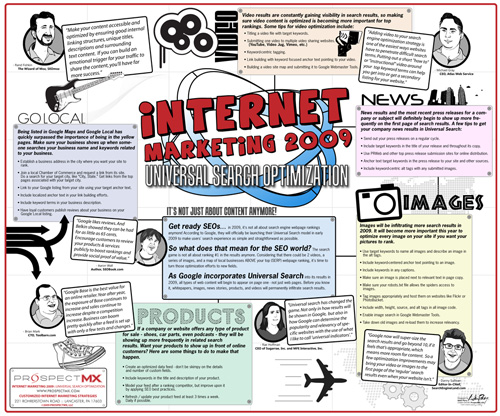


 For example, should you approve comments that are an obvious attempt at leaving a link, and add nothing at all to the conversation? (You know the, “Great post, you rock,” comments). What about anonymous commenting? Do you let people post comments, either positive or negative, if they’re not willing to stand behind what they say and actually leave a real name, email or website?
 Although not as lengthy of a trip as the Tommy Boy venture (but very close to as much fun), yesterday Mark Fischer and I did some old fashioned door-to-door, pounding the pavement sales calls to businesses throughout the greater Philadelphia area.
 A lot of people were affected, including
  The market for eBooks is so cluttered with lead gen tools that when a thought provoking piece enters the market, I think it deserves a pat on the back. “Sticky SEO” by David Leonhart - President of