The Cheat Sheet For Link Building Using Pinterest

A Pinterest board with several dofollow links included

There’s a lot of chitchat amongst the throngs of social networking-philes about the rise of Pinterest this year as a player in the social media universe.

While there are still tons and tons of consumers seeing their Facebook and Twitter friends (mostly female) using Pinterest who want to get in on the “pindemonium” (cheesy – sorry), the internet marketing community is actively trying to figure out the best way to leverage Pinterest and its reported ability to drive more referral traffic on the web than Twitter as a way to aid client campaigns.

There’s no question that there are benefits for referring traffic – and that’s very important. However, like many internet marketers who have come up through the ranks as link builders, I often look at the web as connections via blue words. With the knowledge that search engines are increasingly looking to social signals as a way to establish website quality and relevance for keyword rankings, it’s becoming harder as Pinterest grows to deny its potential to positively effect an SEO campaign (aside from the dofollow links :) ).

After taking some time to read other people’s opinions on the subject (as well as gather my own), I’d like to share my cheatsheet for link building using Pinterest.

How do you build links using Pinterest?

To me, the link building process on Pinterest is very similar to link building using any other social bookmarking tool. Here’s the step by step process I take…

  1. Identify images on each of your top product or service pages that are most compelling. Try to avoid company logos or call to action images (like your BUY NOW button), however.
  2. Create a board that includes a target keyword phrase for a series of the images you’ve selected. If you’re a tobacco retailer and want to feature your premium product, maybe your board should be called “Premier Cigars from Santo Domingo.”
  3. Make sure you have the “Pin It” bookmarklet installed on the toolbar of your web browser and that you’re logged in to Pinterest.
  4. Navigate your website to pull up the unique pages of each product/service that host the images you want to pin.
  5. Click your bookmarklet and make sure you have the right image selected as well as the right board assigned to your pin.
  6. Type in a caption, trying to use the primary keyword.
  7. Click “Pin it.”
  8. Rinse and repeat as necessary.

What type of websites should be using Pinterest as a link building resource?

In my opinion, any website that sells a product or offers a service where visuals play an important role in the buying process have just cause to build boards of their best images on Pinterest. Some of those particular industries include:

  • Automotive
  • Construction
  • Any e-commerce for consumers
  • Health clubs and spas
  • Home improvement companies
  • Hotels and travel destinations

How can Pinterest links help my brand online in other ways?

A Pinterest board of all images from Amazon.com

As I briefly mentioned above, Pinterest can send a ton of referral traffic and does provide “dofollow” links for shared photos. While links from Pinterest do not contain that highly coveted anchor text that most pro linkers are in search of, it is my belief that having content on Pinterest will begin providing a positive boost in the “social signals” area of the algorithm.

Monitoring your links that have been shared on Pinterest is also a great way to see what products people love on your site, which can lead to helping make decisions for products to target with traditional link building.

There are also individual pages on Pinterest that collect all images shared on the site for a specific domain. If you want to keep track of what types of content and how many times the content on your website that has actually been pinned, the steps are pretty simple:

  1. Go to pinterest.com/source/your.url/ (of course, insert your ACTUAL URL where I put the placeholder “your.url”)
  2. Check out the images people are pinning from your website.
  3. Prepare to be amazed what some people find on your site and pin to their boards!

Final thoughts on links and Pinterest

Now that you’ve beared with me through these steps, you should be better prepared to begin using Pinterest as part of your link building, link popularity, or link marketing strategy. And because the information I included above certainly wasn’t enough… here are five OTHER great posts on link building using Pinterest:
5 Comments

11 Easy Blog Topic Ideas for 2012

One of the biggest questions our customers ask about blogging is “What the heck do I blog about?”

In fact, I’m pretty sure I’ve asked myself that a time or two when it was my turn to contribute content to the blog. I recently sat down and started a list of blog topics that I shared with my coworkers for when they need a little help getting the creative juices flowing.

While I wrote these blog topic ideas with the internet marketing and technology industry in mind, I think with a few tweaks they can easily be used across multiple industries.

Not only did I get a nice little blog post out of this task, I just may have started a new resource we can provide clients during blog consulting and development! Two birds, one stone!

Easy Blog Topic Ideas in a Pinch

  • The “Expert” post – take your area of expertise and simply write up an interesting, insightful, or useful post about it.
  • The “Resource” post – analyze or critique another resourceful post or piece of content (article, infographic, video, etc.)
  • The “Review” post – weigh the pros and cons of different technologies or tools you use in your field.
  • The “Tech” post – talk about a new gadget you’ve played with or give a heads up about up and coming technology.
  • The “List” post – if you’re feeling a little lazy, pick a topic, find 10 – 20 AWESOME resources on it and list them in your post.
  • The “SEO” post – talk to the person in charge of your SEO and find out hot keyword topics in your industry. Then write about them.
  • The “Interview” post – find an employee or another big wig in your industry and interview them.
  • The “Customer Spotlight” post – pick a customer, talk about how awesome they are and throw them a shout out from your team.
  • The “Local Phenomena” post – be one of the first to blog about something unusual happening in your area – an earthquake, a weather phenomena, etc.
  • The “Holiday” post – if you’re blogging around a holiday, throw some interesting facts together – no lie, my Thanksgiving blog post still consistently ranks and gets traffic around the holidays. (Did you know turkeys can drown if they look up while it rains?)
  • The “Personal” post – share something about your life and connect it to a lesson, metaphor or simile to your work or industry. Believe it or not, my 9 month old has taught me a lot about customer service and how to interact with with clients. (No stealsies! I just figured out my next blog post.)
Add Your Comment

How do you market your website

How do you even begin to answer this question, right?

Well, the easiest and most important answer, derived from the title of this post, is a simple yes or no. Do you market your website at all?

If the answer is “no”, you need to re-evaluate the expectations of your website and read this entire article and explore our website in much greater detail.

If the answer is “yes”, you are most definitely in a better position than those who answered “no” and should still read this entire article and explore our website to ensure you’re doing it right.

If your answer was “no”, please consider the following statement as a professional tip, and not a slap on the hand. If you have a website, but don’t market it, how do you expect people to find it? Marketing a website is just like marketing a brick and mortar business. You can’t just slap a sign on a building and expect business to spontaneously erupt. You have to cultivate it over a period of time and continually fine tune your marketing efforts until your business grows into a brand that people recognize and trust.

This same concept goes for your website, and I assure you, this is one million times more important than offline marketing. Why?

  1. There are billions of web pages on the internet compared to your local/national/international competition. You’re competing with them all for Search Engine Rankings.
  2. The internet is the go-to resource for almost all products and services purchased in today’s economy.
  3. The opportunity to grow your business using the internet is far greater than growing your business the traditional way. There are billions of web searches everyday and I guarantee a shocking amount of those searches are related to your area of expertise.

If you’re doing no marketing at all, or don’t have a website to market, we encourage you to assess the value of owning, and/or marketing a website. Contact us and we’ll be happy to get you started. It’s easier than you think.

If you answered yes, you should write down the marketing adventures you have taken to date, and make sure the following are on the list. Remember, this list only pertains to online marketing.

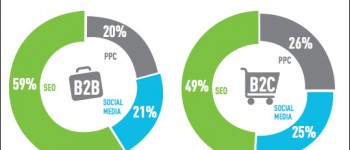
  • SEO | Has your site been optimized for the SERP’s? (Search engine results page)
  • PPC (Pay-Per-Click)
  • Social Media Outreach

Please also remember that Google is not the only search engine out there. You may answer, yes, we do PPC, but do you only do Google Adwords? Did you know that Yahoo and Bing also offer PPC advertising? Even more important, the most popular social media sites like Facebook, LinkedIn and Twitter also offer PPC at great prices. The lesson there; don’t limit yourself, explore all options.

The true secret to marketing your website is not actually a secret at all. There are hundreds, if not thousands, of websites online totally dedicated to explaining the different aspects of Internet Marketing. If you do a search in your favorite search engine for “internet marketing techniques“, you’ll be over whelmed at the options available to you. You’ll probably be disappointed to learn that you will need some assistance with a lot of these techniques but you’ll also find quite a bit that you’ll be able to do on your own.

The most important thing is that you start marketing your website immediately.

Try this:

  1. Visit your favorite Search Engine
  2. Using keywords, search for things that are relevant to your business (don’t search your business name, although, there is a lesson to be learned there too!)
  3. Study the search engine results.

Did you find any companies that you are in direct competition with?

Did you find your company? If so, on what page of the SERP’s did you show up?

This simple test will prove, above and beyond any research you do, that it’s time to market your business online as soon as possible. If the competition is ranking higher than you, chances are, they’ve already dived into the world of Internet Marketing and you  have a lot of catching up to do.

Add Your Comment

Best Practices for Improving Your Online Search Experience

Google is among the best of the best when it comes to search engines. In fact, Google receives over 300 million visitors and well over 2 billion search queries on any given day. Sadly, the average people performing these searches are not using the search engine to its fullest extent.

There are a countless number of ways that you can target your search more effectively and increase your search experience. Below are a few tips to get you started.

Quotes

Use quotes around words that you are looking for together. Otherwise, you will get results that would randomly contain any or all of the keywords you list. Example: “Independence Day”.

Minus Sign (-)

Place a minus sign preceding any words you wish to exclude from your search. Example: “Michael Jackson” -“Jackson 5”. This will only display results for Michael Jackson, unrelated to the Jackson 5.

Plus Sign (+)

Place the plus sign before any words that you want to include in your search. Example: “Michael Jackson” +“Jackson 5”. Now, search results that appear will only showcase topics related to both Michael Jackson and the Jackson 5.

Site

Include the website in your search query when you are looking for something specific on any given site. Example: “Link Building” site:ProspectMX.com. The hits are only related to the topic of choice for the site that’s submitted to the operator. This can also be reversed if you’re trying to get results when you want to exclude a site from your results. Example: “Fashion News” -site:FashionNews.com.

Fail

When you’re searching for negative product reviews or even epic sports fails, consider placing the word “fail” immediately following your initial query. Example: “sports” fail.

InTitle

Starting your search with “InTitle” tells the search engine to limit your hits by containing only those terms in the text of the title. Example: InTitle: “Top 10 Vacation Spots”.

InText

Including “InText” in your search query restricts Google to contain all the words you inquired to appear on the text of the page. Example: InText: “Top 10 Vacation Spots”.

InURL

By placing “InURL” in your search, you are telling the operator to place the words as they appear in the website URL of the search results. Example: InURL: “Top 10 Vacation Spots”.

Happy Googling!

1 Comment

Press Release Writing 101

Press releases are the best and most formal way to make the media aware of your company announcing something of newsworthy value. This could include launching a new product or service, or making the public aware of a new CEO leading the pack.

The most important aspects to keep in mind when crafting a press release is to:

Engage the Reader

Keep your target audience in mind through the entire writing process. Press releases are intended for the PRESS. Just think of the amount of press releases that a reporter receives each and every day. Make the content interesting and engaging. Another way to spruce things up is to include photos, business logos, and even charts. Anything that catches the eye will do the trick!

Optimize Content

There are several online press release distribution sites that allow you to reach your media contacts as well as push your press release on the web. To get the most out of online submissions, make your press release stand out with keyword rich content. This will help potential customers find your website on the top pages of Google search results when performing a specialized search related to your product or service.

Verify that Objectives are Met

Keep your eyes on the prize. Read your press release over and over again to confirm that your objectives have been met. Are you portraying your company in the highest regards? Are you including all the details upfront; who, what, where, when, why and how? Are you promoting what you intended? These are all valid questions to make sure you’re on topic.

Include a Call to Action

Toward the end of your press release include a call to action. This can be leading back to your website talking specifically about the product or service being promoted or even to your blog. Don’t hesitate to also include your social media sites as well to gain more exposure.

Not Exceed in Length

Don’t over kill it. A good rule of thumb is sticking between 300 and 500 words for a good press release. If you’re including great detail, an acceptable press release can be up to 800 words in length.

Check for Grammar

Take time to read your press release—and then read it again, checking for any grammar or punctuation mistakes. It’s always wise to have a second pair of eyes. No matter how often you might read over something, you might be missing the fine details.

1 Comment